
Support Centre · Guided tour · Step 1 of 10
1. Welcome to your portal
3 min
By the end of this step
You know what you will do in the portal and how to get around it.
Foyer is the private place where you and your agent put together your rental file: the documents a landlord asks for, the rental application, a letter about you, and the photos of the places you see. Nothing here is public. Only you, your agent and the people you invite can open it.
- You arrived through the invitation email your agent sent, or through their personal link, and chose a password. From now on you sign in at getfoyernow.com with your email and that password.
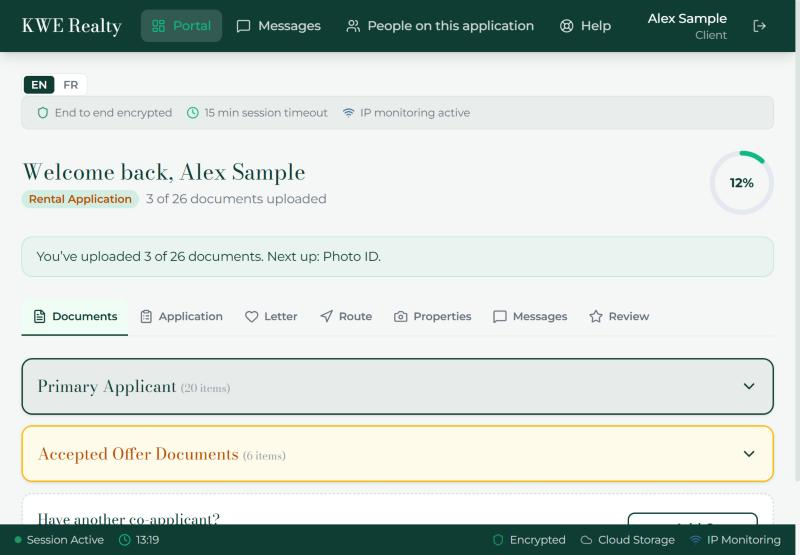
- The welcome at the top says how many documents are in and what to send next. The ring on the right is your progress.
- The tab bar under the welcome is the whole portal: Documents, Application, Letter, Route, Properties, Messages and Review. It stays with you on every page.
- EN and FR at the top right switch the language. Your choice is remembered.
- The strip under them says what protects your file: everything is encrypted, your session ends after 15 minutes without activity, and sign-ins from unusual places are watched. Everything is stored in Canada.
- Your name at the top right opens your account page; the door icon beside it signs you out.
- Foyer is also an app for iPhone and Android, with the same screens and a notice on your phone when your agent writes or plans a day. Your account page also has a switch for texts, so news on your file reaches your phone even without the app; step 10 shows it.
What your agent sees
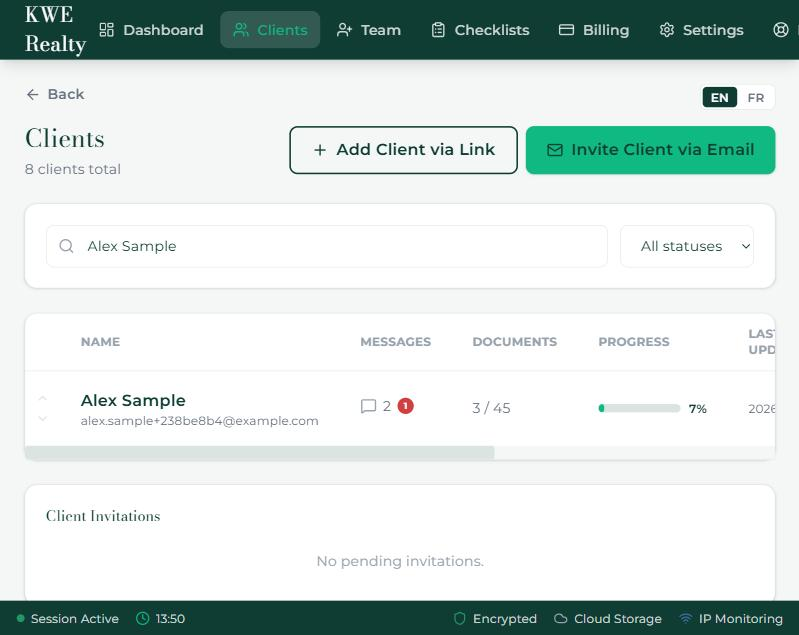
Your agent sees your full name on their Clients list with the same progress, and opens your file by pressing it. They never see your password.
Still stuck? Write to support@getfoyernow.com