
Support Centre · Guided tour · Step 1 of 14
1. Welcome to Foyer
4 min
By the end of this step
You know what Foyer is for, you can sign in, switch language, and find help.
Foyer is the place a renter’s file comes together: the documents, the rental application, a letter to the landlord, the day’s showings and the places they saw, then one link that hands the finished package to the listing agent or landlord. You run it from your side; your client works from a portal of their own, on their phone, in English or French.
Signing in
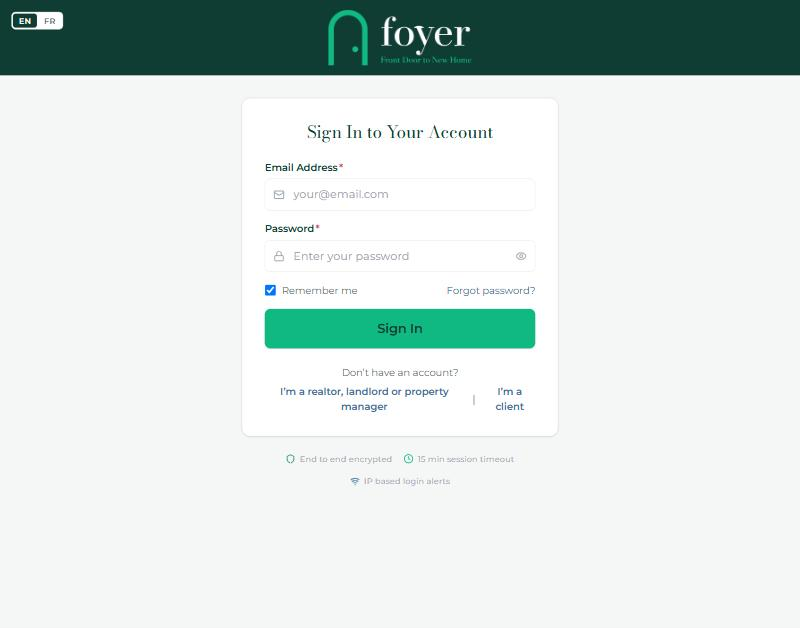
- Go to getfoyernow.com/login. Enter your email and password and press Sign In.
- Sign in with Google or Sign in with Apple, when the buttons are shown, open the same account without a password, as long as the Google or Apple email is the one on your Foyer account.
- If your brokerage requires two-step verification, the next screen asks for the six-digit code from your authenticator app. Step 2 shows how to turn it on.
- A sign in from a new device or address sends you an email at once. That is normal the first time on a new phone or computer.
Finding your way
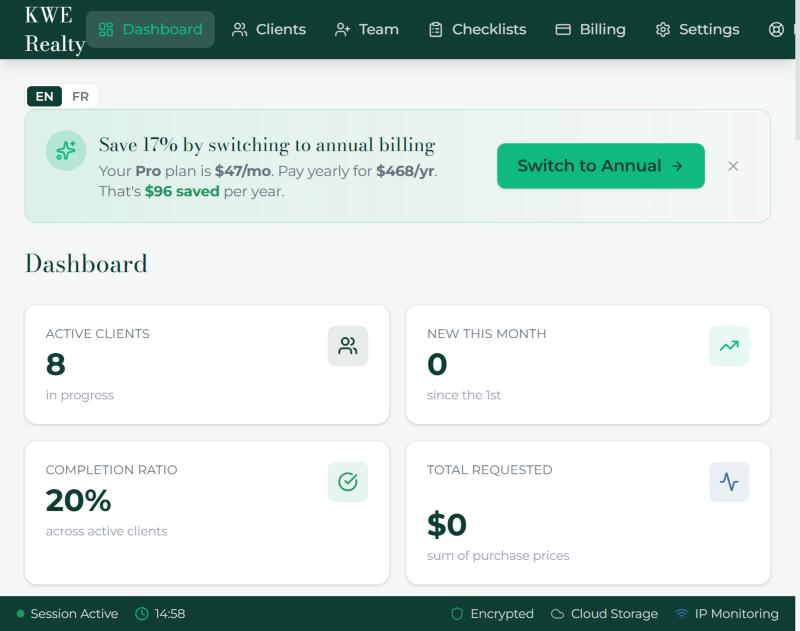
- The top bar is the same on every page: Dashboard, Clients, Checklists, Billing, Settings and Support. Your name and a sign-out button sit at the right.
- The EN | FR switch at the top right of a page changes the language for you. Your clients choose theirs separately, and Foyer emails each person in their own language.
- Sessions end after fifteen minutes without activity. The bar at the bottom shows the time left; any click resets it.
- Foyer is also an app for iPhone and Android, with the same screens and a notice on your phone when a client does something. Once the stores list it, the sign-in page shows a button for each store.
- Everything Foyer emails you about a client can also reach you as a text. Step 2 shows the switch.
When you are stuck
- The Support Centre answers most questions in a page each, in both languages.
- Vera, the assistant on the public website, answers questions about what Foyer does.
- A person reads support@getfoyernow.com.
Still stuck? Write to support@getfoyernow.com